Hello everybody!
Today I am thrilled to announce the BETA version of Libre Workspace 26.3.
Following our recent updates, version 26.3 brings massive architectural upgrades—most notably a fully native mail stack, overhauled Matrix authentication, and a new delegated administrator role for cleaner organization management.
The stable release of 26.3 is planned for July 15th, 2026.
Everyone is welcome to test out this new version and share feedback in this thread or the issues section. To test it out, you can switch non-production systems to the “testing” branch by changing stable to testing inside /etc/apt/sources.list.d/libre-workspace-stable.list and running a normal update.
 Highlights of Libre-Workspace 26.3.0
 Native Mail Stack Integration
We have built a full-featured, native email server stack directly into Libre Workspace!
-
Core Stack: Integrated Postfix (SMTP routing), Dovecot (IMAP/LMTP), and SnappyMail (webmail client).
-
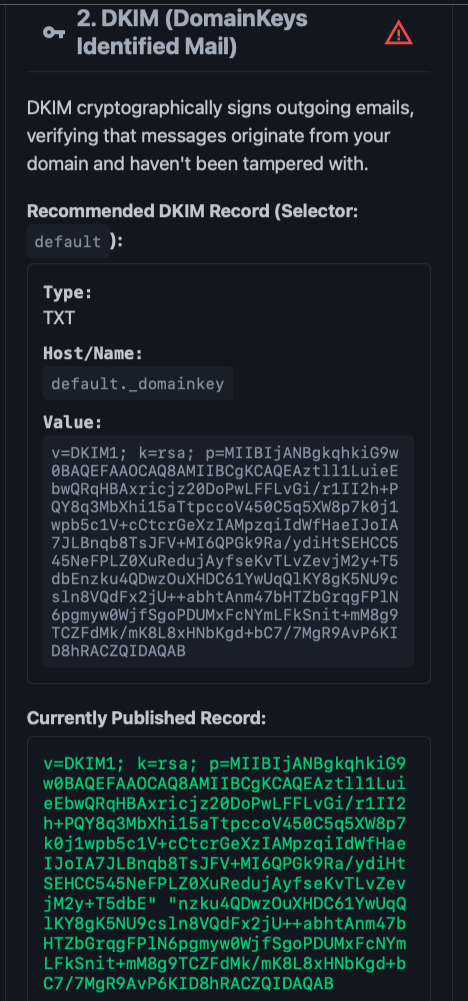
Easy Admin: Includes a step-by-step DNS configuration guide (MX, SPF, DKIM, DMARC) directly in the UI. OpenDKIM automatically generates 2048-bit key pairs on setup.
-
User Features: Automatic folder registration (Drafts, Junk, Trash, etc.), native mail forwarding/aliases management, and built-in Sieve filter support for custom sorting rules and out-of-office replies.
-
REST API & Quotas: A new MTA API client view lets you manage active outbound routes, hourly rate quotas, and remote domains (with a Standalone Mode fallback for unlimited local routing). This will be a bookable service in the future for all libre workspace instances which don’t want to handle the mail sending and receiving by themselves.
 “Libre-Workspace-Glue”
To tie our growing ecosystem together, we have significantly expanded our internal automation capabilities.
-
Future-Proof Automation: Added a robust set of new event signals for addons triggered during user creation, user updates, group creation, and group updates. This lays the groundwork to easily automate Nextcloud group folder creation, Matrix chat rooms, and more.
-
All-in-One Dashboard Layout: We introduced a new sidebar on the left side of the front page. All integrated addons can now be opened directly inside the portal frame—no more jumping between separate browser tabs!
 Libre Workspace Task Queue
We have introduced a brand-new task management system to handle background operations.
-
Traceable & Transparent: This system makes it incredibly clear and easy to follow exactly what the backend is doing during module installations, upgrades, and system processes.
-
Admin Auditing: A dedicated new admin page allows you to trace, audit, and view the execution history of all issued background tasks.
 Matrix Authentication Service (MAS) Migration
User logins for the Matrix (Synapse) module have been refactored. Authentication is now delegated through the Matrix Authentication Service (MAS) instead of direct LDAP configurations.
-
MAS acts as an intermediate broker, linking Matrix authentication straight into our central OIDC identity provider.
-
Setup and rebuild scripts (
setup_matrix.sh/rebuild_matrix.sh) have been rewritten to automate this transition seamlessly.
 Restricted “User Administrator” Role
To support organizations where managers need to add users but shouldn’t touch server infrastructure, we’ve added a delegated admin role. Users in the user-admins LDAP group can manage users and groups, but they:
-
Cannot access the “Easy Dashboard” or system settings.
-
Cannot delete themselves, the default
Administrator, or full system admins. -
Cannot modify privileged security groups or promote anyone to full system admin.
 Dashboard Import/Export & Customizations
-
Migration Tools: Added Django management commands (
export_dashboard,import_dashboard) and shell wrappers to easily backup or migrate card layouts, visibility rules, and branding. -
Smart Layouts: A new
overwrite_automatic_generationattribute ensures your custom card titles, icons, and URLs don’t get wiped out during system reloads.
 Jitsi Meet Upgrades
-
OIDC Security: Configured OIDC redirection via
jitsi-go-openidso only authenticated portal users can create or join rooms. -
WebSocket Proxies: Added bypass paths in the Jaddy proxy configuration for Colibri WebSockets, completely resolving random call drops during conferences.
 Maintenance, Backups & Reliability
-
Backup Penalties: If your last 7 backup runs fail, the system status calculator will now automatically deduct 20% from the overall system health score.
-
Borg Remote Paths: Updated backup routines to natively support secure remote storage via the
$REMOTEPATHenvironment variable. -
IP Change Automation: The
change_ipscript now scans/root/directories and automatically runsdocker compose down && docker compose up -dto reinitialize networking for containers on host IP changes. -
Self-Healing Cron: A backend daemon now runs an hourly non-interactive
dpkgfix to automatically clear broken or interrupted package installations. -
SSE Connection Stability: The installation dashboard now automatically retries connection to the Server-Sent Events (SSE) log stream every 3 seconds if it drops out.
 UI/UX & Documentation Updates
-
Appearance Controls: Added an option to force the dashboard into Light Mode, and administrators can now completely disable/hide the “Password Reset” links.
-
Hardware Requirements Documentation: Rewrote
installation.rstto provide exact baseline recommendations ranging from a Minimal instance (2 GB RAM, 1 CPU for portal/Nextcloud only) to a Mid-Tier Server (10 GB RAM, 4 CPU) and Enterprise sizing. -
Translations: Cleaned up duplicate keys and formatting bugs in both English and German localization catalogs.
 Notable Bug Fixes
-
OIDC RSA Key Bloat: Fixed a critical bug where a new duplicate OIDC RSA key pair was generated on every single startup. Added a self-healing patch to safely prune redundant keys from your database.
-
Identifiable Backups: Backup error email subjects now include the specific server instance name for easier troubleshooting in multi-site deployments.
You are welcome to report any bugs you find in this thread or directly at Issues - Libre_Workspace/libre-workspace - Codeberg.org
Cheers,
Jean


 Klingt aber spannend!
 Kann euch aber versichern, dass das für euch kein großes Sicherheitsrisiko darstellt.