Pontainer + Xibo

Hallo in die Runde ,
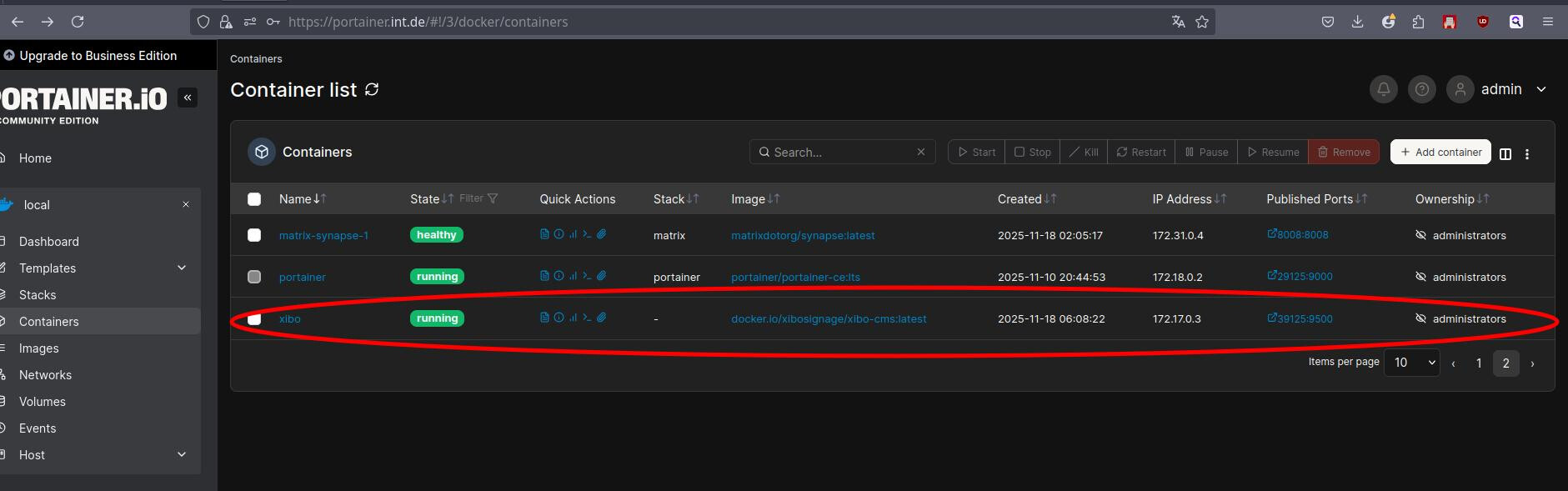
Habe über Portainer Xibo installiert,
Laut portainer läuft es angeblich , nur leider über web nicht erreichbar , obwohl ip server : 39125 wird eingegeben


Lines
Actions


Waiting for MySQL to start - max 300 seconds

Waiting for MySQL to start - max 300 seconds

MySQL started

Configuring MySQL cnf file

Updating settings.php

ERROR 2005 (HY000): Unknown server host 'mysql' (-2)

New install

Provisioning Database

ERROR 2005 (HY000): Unknown server host 'mysql' (-2)

Phinx by CakePHP - https://phinx.org. 0.9.2

using config file .varwwwcmsphinx.php

using config parser php

using migration paths 

 - /var/www/cms/db/migrations

warning no environment specified, defaulting to: production

using adapter mysql

using database cms

In MysqlAdapter.php line 115:


  There was a problem connecting to the database: SQLSTATE[HY000] [2002] php_  

  network_getaddresses: getaddrinfo failed: Name does not resolve              


migrate [-c|--configuration CONFIGURATION] [-p|--parser PARSER] [-e|--environment ENVIRONMENT] [-t|--target TARGET] [-d|--date DATE] [-x|--dry-run]

Configuring Database Settings

ERROR 2005 (HY000): Unknown server host 'mysql' (-2)

ERROR 2005 (HY000): Unknown server host 'mysql' (-2)

ERROR 2005 (HY000): Unknown server host 'mysql' (-2)

ERROR 2005 (HY000): Unknown server host 'mysql' (-2)

ERROR 2005 (HY000): Unknown server host 'mysql' (-2)

ERROR 2005 (HY000): Unknown server host 'mysql' (-2)

Setting up Maintenance

Protected Maintenance

ERROR 2005 (HY000): Unknown server host 'mysql' (-2)

ERROR 2005 (HY000): Unknown server host 'mysql' (-2)

Importing ca-certs

cp: can't stat '/var/www/cms/ca-certs/*.pem': No such file or directory

cp: can't stat '/var/www/cms/ca-certs/*.crt': No such file or directory

WARNING: ca-certificates.crt does not contain exactly one certificate or CRL: skipping

Setting up Quickchart

ERROR 2005 (HY000): Unknown server host 'mysql' (-2)

ERROR 2005 (HY000): Unknown server host 'mysql' (-2)

Configuring Maintenance

Removing web/install/index.php from production container

ERROR 2005 (HY000): Unknown server host 'mysql' (-2)

Starting cron

Starting webserver

AH00558: httpd: Could not reliably determine the server's fully qualified domain name, using 172.17.0.3. Set the 'ServerName' directive globally to suppress this message

tach,
ist denn in deiner compose Vorlage eine mysqldb enthalten?

1 „Gefällt mir“

Laut Container inspect fehlt der Eintrag , komisch , soll ich eine anderen xibo Container nehmen ?

{
AppArmorProfile:"docker-default",
Args:[
],
Config:{
AttachStderr:false,
AttachStdin:false,
AttachStdout:false,
Cmd:[
"/entrypoint.sh"
],
Domainname:"",
Entrypoint:null,
Env:[
"PATH=/usr/local/sbin:/usr/local/bin:/usr/sbin:/usr/bin:/sbin:/bin",
"CMS_DEV_MODE=false",
"INSTALL_TYPE=docker",
"XMR_HOST=xmr",
"CMS_SERVER_NAME=localhost",
"MYSQL_HOST=mysql",
"MYSQL_USER=cms",
"MYSQL_PASSWORD=none",
"MYSQL_PORT=3306",
"MYSQL_DATABASE=cms",
"MYSQL_BACKUP_ENABLED=true",
"MYSQL_ATTR_SSL_CA=none",
"MYSQL_ATTR_SSL_VERIFY_SERVER_CERT=true",
"CMS_SMTP_SERVER=smtp.gmail.com:587",
"CMS_SMTP_USERNAME=none",
"CMS_SMTP_PASSWORD=none",
"CMS_SMTP_USE_TLS=YES",
"CMS_SMTP_USE_STARTTLS=YES",
"CMS_SMTP_REWRITE_DOMAIN=gmail.com",
"CMS_SMTP_HOSTNAME=none",
"CMS_SMTP_FROM_LINE_OVERRIDE=YES",
"CMS_SMTP_FROM=none",
"CMS_ALIAS=none",
"CMS_PHP_SESSION_GC_MAXLIFETIME=1440",
"CMS_PHP_POST_MAX_SIZE=2G",
"CMS_PHP_UPLOAD_MAX_FILESIZE=2G",
"CMS_PHP_MAX_EXECUTION_TIME=300",
"CMS_PHP_MEMORY_LIMIT=256M",
"CMS_PHP_COOKIE_SECURE=Off",
"CMS_PHP_COOKIE_HTTP_ONLY=On",
"CMS_PHP_COOKIE_SAMESITE=Lax",
"CMS_APACHE_START_SERVERS=2",
"CMS_APACHE_MIN_SPARE_SERVERS=5",
"CMS_APACHE_MAX_SPARE_SERVERS=10",
"CMS_APACHE_MAX_REQUEST_WORKERS=60",
"CMS_APACHE_MAX_CONNECTIONS_PER_CHILD=300",
"CMS_APACHE_TIMEOUT=30",
"CMS_APACHE_OPTIONS_INDEXES=false",
"CMS_QUICK_CHART_URL=http://cms-quickchart:3400",
"CMS_APACHE_SERVER_TOKENS=OS",
"CMS_APACHE_LOG_REQUEST_TIME=false",
"CMS_USE_MEMCACHED=false",
"MEMCACHED_HOST=memcached",
"MEMCACHED_PORT=11211",
"CMS_USAGE_REPORT=true",
"XTR_ENABLED=true",
"GIT_COMMIT=67a66bf409e11a6dafdbe24ac8b32169ab05ffff"
],
ExposedPorts:{
80/tcp:{
},
9500/tcp:{
}
},
Hostname:"0b99d6893d9c",
Image:"docker.io/xibosignage/xibo-cms:latest",
Labels:{
},
MacAddress:"02:42:ac:11:00:03",
OnBuild:null,
OpenStdin:false,
StdinOnce:false,
Tty:false,
User:"",
Volumes:{
/var/www/backup:{
},
/var/www/cms/ca-certs:{
},
/var/www/cms/custom:{
},
/var/www/cms/library:{
},
/var/www/cms/web/theme/custom:{
},
/var/www/cms/web/userscripts:{
}
},
WorkingDir:""
},
Created:"2025-11-18T05:08:22.650944326Z",
Driver:"overlay2",
ExecIDs:[
"160a8ad00125ae27f9dbfd0f8d8f8d89595f5e13a3e7409ee91d57357d0ba4b6"
],
GraphDriver:{
Data:{
LowerDir:"/var/lib/docker/overlay2/06418d16dcfea4ff4b26810a8ecc9abbf190fdfd1080c42862632112e56d6eaa-init/diff:/var/lib/docker/overlay2/4beab129730536c74287d61ba547bd5d3292ec7725b920442a4af4c31a40a925/diff:/var/lib/docker/overlay2/a6bed072a7d368b6956aa521eaab643e046252ef474e1e0c44562f97d73b5524/diff:/var/lib/docker/overlay2/5b4a602656cb005a260fe3c6716c37e618ec3d960b1823b54f42b6b143113681/diff:/var/lib/docker/overlay2/e29406d80b9a5e089b9e6b30093627010dced2544a24261d4bc5d1ed5596fecc/diff:/var/lib/docker/overlay2/a05f1d85f652b5ba079b65b78092bcd2a75167c1dd9fe27c1e7d332322193c4c/diff:/var/lib/docker/overlay2/7830256cf157d7614c93e6949d9363de1544f07a85571d2ec52eaada6eaed69a/diff:/var/lib/docker/overlay2/a236a85b0fcc9d2572ec4276097da88188a44d7bfc3be371aaf78103b9714619/diff:/var/lib/docker/overlay2/9dedc70ad537f4226355a9dc1cf85a3f9fcc5aea512df8ce01ecb3095891292e/diff:/var/lib/docker/overlay2/d1c61238b1769333b7379d9886ce64ee2c0a07f73f4c0ea95bee411492648127/diff:/var/lib/docker/overlay2/be973667ea9e0d0bc2f1b6d2df73284727d87817fdf47eb044dce99877ab0be1/diff:/var/lib/docker/overlay2/ed95db14677255a5e8202ca94f94080d6db0995efab91a333138522b4496878f/diff:/var/lib/docker/overlay2/77cd22c9fb095c7129122454cb4c1bc82b8c6b0f454ce373486b9908c0cddb77/diff:/var/lib/docker/overlay2/b750ea0b1d2057f04e52e2a2fa44998240488a648e5f4ebd5f6e37c3b7a6e870/diff",
MergedDir:"/var/lib/docker/overlay2/06418d16dcfea4ff4b26810a8ecc9abbf190fdfd1080c42862632112e56d6eaa/merged",
UpperDir:"/var/lib/docker/overlay2/06418d16dcfea4ff4b26810a8ecc9abbf190fdfd1080c42862632112e56d6eaa/diff",
WorkDir:"/var/lib/docker/overlay2/06418d16dcfea4ff4b26810a8ecc9abbf190fdfd1080c42862632112e56d6eaa/work"
},
Name:"overlay2"
},
HostConfig:{
AutoRemove:false,
Binds:[
"bf20abd7b703fa6b4c98943390f32efc2db154996ddd76064e47a2c18cc5c0a5:/var/www/cms/ca-certs",
"1821eacb36a08c688b3f5e83a95a1f17f75fc2b559a4eca67de2c92570c95518:/var/www/cms/custom",
"e2267742d1d217a0fff982206c47ac78577d3a50a8b5f98d4037bda24d7a5ff7:/var/www/cms/library",
"c36befcfbe058523b352fc0923ad8bbec46e3be9a7bffcf4b5ef452d7344d244:/var/www/cms/web/theme/custom",
"a0ecef27ceee25f38428339be72912d6f67e03af171592b75ba3832d3435d96a:/var/www/cms/web/userscripts",
"a484485de197f247263690a76e6a4f0138d0c7f8b2b001c36cb1471912d50798:/var/www/backup"
],
BlkioDeviceReadBps:null,
BlkioDeviceReadIOps:null,
BlkioDeviceWriteBps:null,
BlkioDeviceWriteIOps:null,
BlkioWeight:0,
BlkioWeightDevice:null,
CapAdd:[
"AUDIT_WRITE",
"CHOWN",
"DAC_OVERRIDE",
"FOWNER",
"FSETID",
"KILL",
"MKNOD",
"NET_BIND_SERVICE",
"NET_RAW",
"SETFCAP",
"SETGID",
"SETPCAP",
"SETUID",
"SYS_CHROOT"
],
CapDrop:[
"AUDIT_CONTROL",
"BLOCK_SUSPEND",
"DAC_READ_SEARCH",
"IPC_LOCK",
"IPC_OWNER",
"LEASE",
"LINUX_IMMUTABLE",
"MAC_ADMIN",
"MAC_OVERRIDE",
"NET_ADMIN",
"NET_BROADCAST",
"SYSLOG",
"SYS_ADMIN",
"SYS_BOOT",
"SYS_MODULE",
"SYS_NICE",
"SYS_PACCT",
"SYS_PTRACE",
"SYS_RAWIO",
"SYS_RESOURCE",
"SYS_TIME",
"SYS_TTY_CONFIG",
"WAKE_ALARM"
],
Cgroup:"",
CgroupParent:"",
CgroupnsMode:"private",
ConsoleSize:[
0,
0
],
ContainerIDFile:"",
CpuCount:0,
CpuPercent:0,
CpuPeriod:0,
CpuQuota:0,
CpuRealtimePeriod:0,
CpuRealtimeRuntime:0,
CpuShares:0,
CpusetCpus:"",
CpusetMems:"",
DeviceCgroupRules:null,
DeviceRequests:[
],
Devices:[
],
Dns:[
],
DnsOptions:null,
DnsSearch:null,
ExtraHosts:[
],
GroupAdd:null,
IOMaximumBandwidth:0,
IOMaximumIOps:0,
Init:false,
IpcMode:"private",
Isolation:"",
Links:null,
LogConfig:{
Config:{
},
Type:"json-file"
},
MaskedPaths:[
"/proc/asound",
"/proc/acpi",
"/proc/kcore",
"/proc/keys",
"/proc/latency_stats",
"/proc/timer_list",
"/proc/timer_stats",
"/proc/sched_debug",
"/proc/scsi",
"/sys/firmware",
"/sys/devices/virtual/powercap"
],
Memory:0,
MemoryReservation:0,
MemorySwap:0,
MemorySwappiness:null,
NanoCpus:0,
NetworkMode:"bridge",
OomKillDisable:null,
OomScoreAdj:0,
PidMode:"",
PidsLimit:null,
PortBindings:{
9500/tcp:[
{
HostIp:"",
HostPort:"39125"
}
]
},
Privileged:false,
PublishAllPorts:false,
ReadonlyPaths:[
"/proc/bus",
"/proc/fs",
"/proc/irq",
"/proc/sys",
"/proc/sysrq-trigger"
],
ReadonlyRootfs:false,
RestartPolicy:{
MaximumRetryCount:0,
Name:"no"
},
Runtime:"runc",
SecurityOpt:null,
ShmSize:67108864,
UTSMode:"",
Ulimits:null,
UsernsMode:"",
VolumeDriver:"",
VolumesFrom:null
},
HostnamePath:"/var/lib/docker/containers/fab4ab3e4bd7c14da5654fe8ef6b2f17f5501d774552a4079d89990e1e181953/hostname",
HostsPath:"/var/lib/docker/containers/fab4ab3e4bd7c14da5654fe8ef6b2f17f5501d774552a4079d89990e1e181953/hosts",
Id:"fab4ab3e4bd7c14da5654fe8ef6b2f17f5501d774552a4079d89990e1e181953",
Image:"sha256:41f9cc4c2459408c254b193ff422ead74f5068cfc7d016669441f953cf2bd2f4",
LogPath:"/var/lib/docker/containers/fab4ab3e4bd7c14da5654fe8ef6b2f17f5501d774552a4079d89990e1e181953/fab4ab3e4bd7c14da5654fe8ef6b2f17f5501d774552a4079d89990e1e181953-json.log",
MountLabel:"",
Mounts:[
{
Destination:"/var/www/backup",
Driver:"local",
Mode:"z",
Name:"a484485de197f247263690a76e6a4f0138d0c7f8b2b001c36cb1471912d50798",
Propagation:"",
RW:true,
Source:"/var/lib/docker/volumes/a484485de197f247263690a76e6a4f0138d0c7f8b2b001c36cb1471912d50798/_data",
Type:"volume"
},
{
Destination:"/var/www/cms/ca-certs",
Driver:"local",
Mode:"z",
Name:"bf20abd7b703fa6b4c98943390f32efc2db154996ddd76064e47a2c18cc5c0a5",
Propagation:"",
RW:true,
Source:"/var/lib/docker/volumes/bf20abd7b703fa6b4c98943390f32efc2db154996ddd76064e47a2c18cc5c0a5/_data",
Type:"volume"
},
{
Destination:"/var/www/cms/custom",
Driver:"local",
Mode:"z",
Name:"1821eacb36a08c688b3f5e83a95a1f17f75fc2b559a4eca67de2c92570c95518",
Propagation:"",
RW:true,
Source:"/var/lib/docker/volumes/1821eacb36a08c688b3f5e83a95a1f17f75fc2b559a4eca67de2c92570c95518/_data",
Type:"volume"
},
{
Destination:"/var/www/cms/library",
Driver:"local",
Mode:"z",
Name:"e2267742d1d217a0fff982206c47ac78577d3a50a8b5f98d4037bda24d7a5ff7",
Propagation:"",
RW:true,
Source:"/var/lib/docker/volumes/e2267742d1d217a0fff982206c47ac78577d3a50a8b5f98d4037bda24d7a5ff7/_data",
Type:"volume"
},
{
Destination:"/var/www/cms/web/theme/custom",
Driver:"local",
Mode:"z",
Name:"c36befcfbe058523b352fc0923ad8bbec46e3be9a7bffcf4b5ef452d7344d244",
Propagation:"",
RW:true,
Source:"/var/lib/docker/volumes/c36befcfbe058523b352fc0923ad8bbec46e3be9a7bffcf4b5ef452d7344d244/_data",
Type:"volume"
},
{
Destination:"/var/www/cms/web/userscripts",
Driver:"local",
Mode:"z",
Name:"a0ecef27ceee25f38428339be72912d6f67e03af171592b75ba3832d3435d96a",
Propagation:"",
RW:true,
Source:"/var/lib/docker/volumes/a0ecef27ceee25f38428339be72912d6f67e03af171592b75ba3832d3435d96a/_data",
Type:"volume"
}
],
Name:"/xibo",
NetworkSettings:{
Bridge:"",
EndpointID:"59d05af4c9c965d8321816d58a6e69cab19963c27ec78e4658e0df0cc0bae733",
Gateway:"172.17.0.1",
GlobalIPv6Address:"",
GlobalIPv6PrefixLen:0,
HairpinMode:false,
IPAddress:"172.17.0.3",
IPPrefixLen:16,
IPv6Gateway:"",
LinkLocalIPv6Address:"",
LinkLocalIPv6PrefixLen:0,
MacAddress:"02:42:ac:11:00:03",
Networks:{
bridge:{
Aliases:null,
DNSNames:null,
DriverOpts:null,
EndpointID:"59d05af4c9c965d8321816d58a6e69cab19963c27ec78e4658e0df0cc0bae733",
Gateway:"172.17.0.1",
GlobalIPv6Address:"",
GlobalIPv6PrefixLen:0,
IPAMConfig:{
},
IPAddress:"172.17.0.3",
IPPrefixLen:16,
IPv6Gateway:"",
Links:null,
MacAddress:"02:42:ac:11:00:03",
NetworkID:"90d196fc0ce9295df6001dd10260f9061bb1cd45cc7766214aa82b89b6158b86"
}
},
Ports:{
80/tcp:null,
9500/tcp:[
{
HostIp:"0.0.0.0",
HostPort:"39125"
},
{
HostIp:"::",
HostPort:"39125"
}
]
},
SandboxID:"b58b0993bd694c5ee5acc2281ef1368c0d30e3401b31f4929af1d5269972e7b4",
SandboxKey:"/var/run/docker/netns/b58b0993bd69",
SecondaryIPAddresses:null,
SecondaryIPv6Addresses:null
},
Path:"/entrypoint.sh",
Platform:"linux",
Portainer:{
ResourceControl:{
Id:4,
ResourceId:"fab4ab3e4bd7c14da5654fe8ef6b2f17f5501d774552a4079d89990e1e181953",
SubResourceIds:[
],
Type:1,
UserAccesses:[
],
TeamAccesses:[
],
Public:false,
AdministratorsOnly:true,
System:false
}
},
ProcessLabel:"",
ResolvConfPath:"/var/lib/docker/containers/fab4ab3e4bd7c14da5654fe8ef6b2f17f5501d774552a4079d89990e1e181953/resolv.conf",
RestartCount:0,
State:{
Dead:false,
Error:"",
ExitCode:0,
FinishedAt:"2025-11-18T05:09:55.740042879Z",
OOMKilled:false,
Paused:false,
Pid:1165261,
Restarting:false,
Running:true,
StartedAt:"2025-11-18T05:09:56.244771566Z",
Status:"running"
}
}
tach unitymedia,
am einfachsten hast du eine installationsquelle mit xibo & mysql datenbank. die alternativen sind schwieriger.

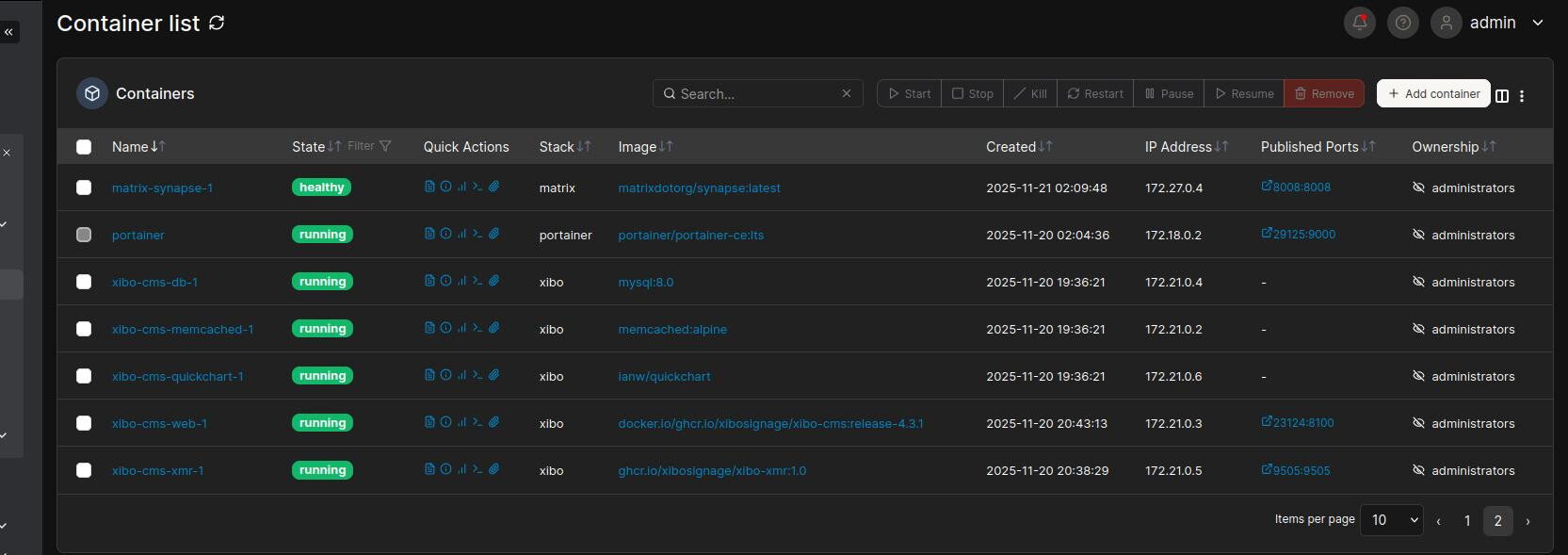
Hallo,
Irgend was mache ich verkehrt ,
habe nach Anleitung installiert

https://xibosignage.com/docs/setup/xibo-for-docker

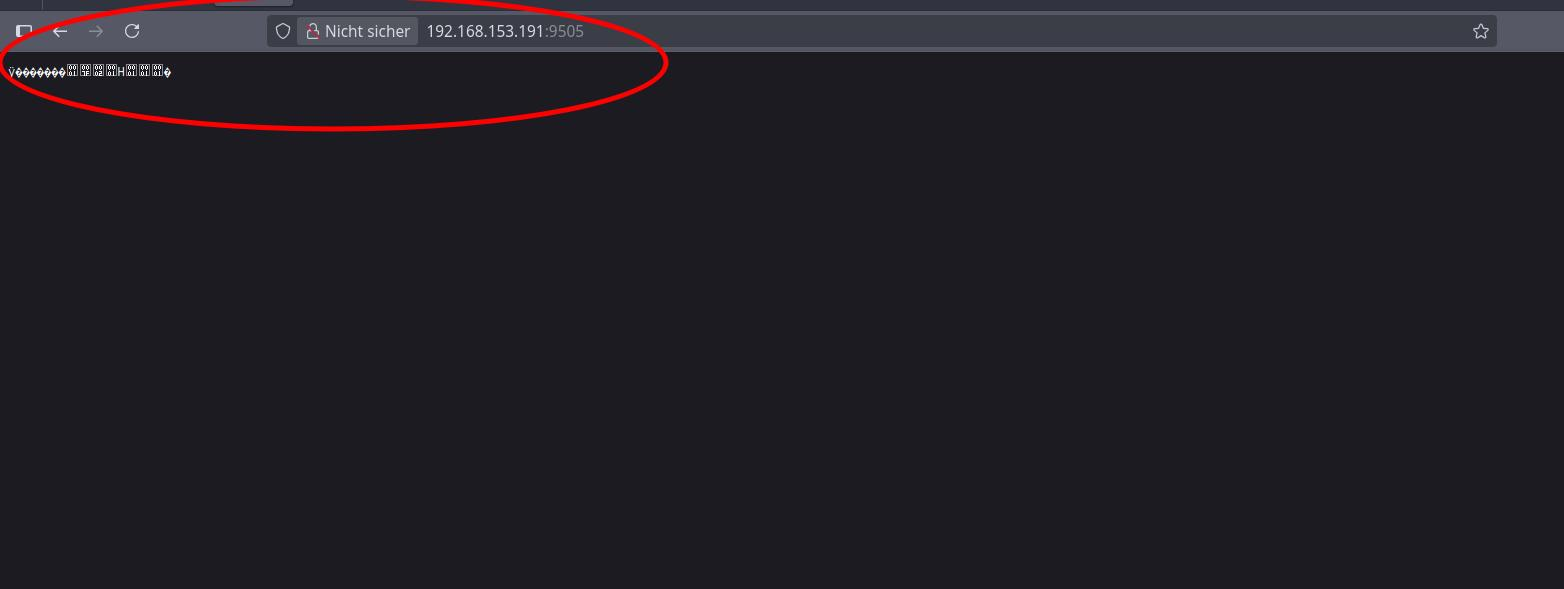
jetzt laut Web ,werden mit komische Zeichen angezeigt

Laut portainer

xibo-cms-xmr-1 Anwendung
gibt kein log raus

No log line matching the '' filter

xibo-cms-web-1 zeigt folgendes an


     up  20210611122809  2025-11-20 19:21:33  2025-11-20 19:21:33  AddPurgeListTableMigration

     up  20210806122814  2025-11-20 19:21:33  2025-11-20 19:21:33  AddNumberOfItemsToPlaylistMigration

     up  20210813094723  2025-11-20 19:21:33  2025-11-20 19:21:33  AddCycleBasedPlaybackOptionToCampaignMigration

     up  20210817105702  2025-11-20 19:21:33  2025-11-20 19:21:33  AddCustomSeparatorToDatasetMigration

     up  20210820100520  2025-11-20 19:21:33  2025-11-20 19:21:33  AddActionEventTypeMigration

     up  20210901134913  2025-11-20 19:21:33  2025-11-20 19:21:33  AddIpAddressColumnToAuditLogMigration

     up  20210901150615  2025-11-20 19:21:33  2025-11-20 19:21:33  AddTooltipAndIsRequiredColumnsMigration

     up  20211109130951  2025-11-20 19:21:33  2025-11-20 19:21:33  FixOrphanedDisplayGroupsMigration

     up  20211109134929  2025-11-20 19:21:33  2025-11-20 19:21:33  FixPlaylistManagerUserGroupMigration

     up  20211109141925  2025-11-20 19:21:33  2025-11-20 19:21:33  DatasetAddOptionToTruncateOnNoNewDataMigration

     up  20211116153103  2025-11-20 19:21:33  2025-11-20 19:21:33  ConnectorsMigration

     up  20211231141457  2025-11-20 19:21:33  2025-11-20 19:21:34  AddMoreTagFilteringOptionsMigration

     up  20211231153355  2025-11-20 19:21:34  2025-11-20 19:21:34  AddIsCustomToDisplayProfileMigration

     up  20220117150212  2025-11-20 19:21:34  2025-11-20 19:21:34  AddLayoutExchangeConnectorMigration

     up  20220119124436  2025-11-20 19:21:34  2025-11-20 19:21:34  AddCodeColumnToMenuBoardsMigration

     up  20220131151346  2025-11-20 19:21:34  2025-11-20 19:21:34  AddDateFormatToDataSetColumnMigration

     up  20220201163832  2025-11-20 19:21:34  2025-11-20 19:21:34  ReportLogoMigration

     up  20220203145712  2025-11-20 19:21:34  2025-11-20 19:21:34  ApplicationsTweaksMigration

     up  20220207160047  2025-11-20 19:21:34  2025-11-20 19:21:34  TidyCalendarModuleTypes

     up  20220224130122  2025-11-20 19:21:34  2025-11-20 19:21:34  AddResolutionRoutesToDesignScopeMigration

     up  20220225105237  2025-11-20 19:21:34  2025-11-20 19:21:34  MergeWeatherWidgets

     up  20220302152503  2025-11-20 19:21:34  2025-11-20 19:21:34  LayoutRemoveOrientationMigration

     up  20220307134554  2025-11-20 19:21:34  2025-11-20 19:21:34  AddWorldClockMigration

     up  20220330111440  2025-11-20 19:21:34  2025-11-20 19:21:34  ModulesTableVerFourMigration

     up  20220512130000  2025-11-20 19:21:34  2025-11-20 19:21:34  AddTwitterConnectorMigration

     up  20220512155400  2025-11-20 19:21:34  2025-11-20 19:21:34  RegionTypeMigration

     up  20220520175400  2025-11-20 19:21:34  2025-11-20 19:21:34  DisplayMediaMigration

     up  20220903153600  2025-11-20 19:21:34  2025-11-20 19:21:35  RequiredfileDependencyMigration

     up  20220906085300  2025-11-20 19:21:35  2025-11-20 19:21:35  ThreeTwoZeroMigration

     up  20220907135653  2025-11-20 19:21:35  2025-11-20 19:21:35  AddLogicalOperatorNameMigration

     up  20220907143500  2025-11-20 19:21:35  2025-11-20 19:21:35  UserHomeFolderMigration

     up  20220915100902  2025-11-20 19:21:35  2025-11-20 19:21:35  AddFontsTableMigration

     up  20220928091249  2025-11-20 19:21:35  2025-11-20 19:21:35  PlayerSoftwareRefactorMigration

     up  20221013103000  2025-11-20 19:21:35  2025-11-20 19:21:35  AdvertisingConnectorsMigration

     up  20221024082400  2025-11-20 19:21:35  2025-11-20 19:21:36  AdCampaignMigration

     up  20221101090337  2025-11-20 19:21:36  2025-11-20 19:21:36  CreateDisplayTypeTableMigration

     up  20221101130018  2025-11-20 19:21:36  2025-11-20 19:21:36  AddDisplayMetaDataMigration

     up  20221104095722  2025-11-20 19:21:36  2025-11-20 19:21:36  CreateDisplayLocationTypeTableMigration

     up  20221124120259  2025-11-20 19:21:36  2025-11-20 19:21:36  AddLayoutIdToActionTableMigration

     up  20230118151031  2025-11-20 19:21:36  2025-11-20 19:21:36  AddAlphaVantageConnectorMigration

     up  20230130114907  2025-11-20 19:21:36  2025-11-20 19:21:36  UpdateCampaignDisplayColumnDataTypeMigration

     up  20230209132720  2025-11-20 19:21:36  2025-11-20 19:21:36  AddOpenWeatherMapConnectorMigration

     up  20230214135035  2025-11-20 19:21:36  2025-11-20 19:21:37  RemoveDoohUserTypeMigration

     up  20230220213618  2025-11-20 19:21:37  2025-11-20 19:21:37  UpdatePlayListTimelineHelpLinkMigration

     up  20230310143321  2025-11-20 19:21:37  2025-11-20 19:21:37  SavedReportMoveOutMigration

     up  20230321105750  2025-11-20 19:21:37  2025-11-20 19:21:37  AddSchemaVersionWidgetMigration

     up  20230411090410  2025-11-20 19:21:37  2025-11-20 19:21:37  AddWidgetCompatibilityTaskMigration

     up  20230509113820  2025-11-20 19:21:37  2025-11-20 19:21:37  ContentSyncMigration

     up  20230530124400  2025-11-20 19:21:37  2025-11-20 19:21:37  WidgetOptionSizeMigration

     up  20230706103000  2025-11-20 19:21:37  2025-11-20 19:21:38  AddSyncKeyToZoneMigration

     up  20230718163600  2025-11-20 19:21:38  2025-11-20 19:21:38  RemoveHelpLinksMigration

     up  20230719154200  2025-11-20 19:21:38  2025-11-20 19:21:39  CollationToUtfmb4Migration

     up  20230725141000  2025-11-20 19:21:39  2025-11-20 19:21:39  ScheduleMetaDataMigration

     up  20230727102500  2025-11-20 19:21:39  2025-11-20 19:21:39  MenuboardAdditionalFieldsMigration

     up  20230731194700  2025-11-20 19:21:39  2025-11-20 19:21:39  LkdgdgPrimaryKeyMigration

     up  20231128144300  2025-11-20 19:21:39  2025-11-20 19:21:40  RealTimeDataMigration

     up  20231213120700  2025-11-20 19:21:40  2025-11-20 19:21:40  ScheduleCriteriaMigration

     up  20231220155800  2025-11-20 19:21:40  2025-11-20 19:21:40  UserModuleTemplatesMigration

     up  20240227100600  2025-11-20 19:21:40  2025-11-20 19:21:40  MenuboardFieldLengthsMigration

     up  20240227102400  2025-11-20 19:21:40  2025-11-20 19:21:40  MissingIndexesMigration

     up  20240408121908  2025-11-20 19:21:40  2025-11-20 19:21:41  DisplayAlertsMigration

     up  20240422111609  2025-11-20 19:21:41  2025-11-20 19:21:41  NotificationTypesMigration

     up  20240430112500  2025-11-20 19:21:41  2025-11-20 19:21:41  CanvasDurationFixMigration

     up  20240501111721  2025-11-20 19:21:41  2025-11-20 19:21:41  SessionHistoryMigration

     up  20240605101251  2025-11-20 19:21:41  2025-11-20 19:21:41  AuditingApiRequestsMigration

     up  20240612112949  2025-11-20 19:21:41  2025-11-20 19:21:41  AddSwitchDelayAndVideoPauseDelayToSyncGroup

     up  20240614031633  2025-11-20 19:21:41  2025-11-20 19:21:41  UpdateSwitchDelayAndVideoPauseDelayMigration

     up  20240615155000  2025-11-20 19:21:41  2025-11-20 19:21:41  WidgetFallbackDataMigration

     up  20240617040320  2025-11-20 19:21:41  2025-11-20 19:21:41  AddOSDetailsToDisplayTableMigration

     up  20240717043020  2025-11-20 19:21:41  2025-11-20 19:21:41  AddDataConnectorSourceToDatasetTableMigration

     up  20240717113400  2025-11-20 19:21:41  2025-11-20 19:21:42  AddLastUsedTimeToSessionHistoryTableMigration

     up  20240903142530  2025-11-20 19:21:42  2025-11-20 19:21:42  AddCapConnectorMigration

     up  20240909114945  2025-11-20 19:21:42  2025-11-20 19:21:42  AddFolderFilterToPlaylistTableMigration

     up  20241002121300  2025-11-20 19:21:42  2025-11-20 19:21:42  AddDefaultChromeOSDisplayProfileMigration

     up  20250115120000  2025-11-20 19:21:42  2025-11-20 19:21:42  AddNationalWeatherServiceConnectorMigration

     up  20250115151900  2025-11-20 19:21:42  2025-11-20 19:21:42  AddXmrWsSettingMigration

     up  20250121120000  2025-11-20 19:21:42  2025-11-20 19:21:42  UpsertCoreEmergencyAlertInModule

     up  20250123160800  2025-11-20 19:21:42  2025-11-20 19:21:42  UpdateMetricColumnLimitInScheduleCriteria

     up  20250430164700  2025-11-20 19:21:42  2025-11-20 19:21:42  AnonymousUsageEnhancedMigration

     up  20250520120000  2025-11-20 19:21:42  2025-11-20 19:21:42  UpdateCustomMetricPrefixMigration

     up  20250602070030  2025-11-20 19:21:42  2025-11-20 19:21:42  UpsertInteractiveButtonInModuleTableMigration

     up  20250702145100  2025-11-20 19:21:42  2025-11-20 19:21:42  FixOauthRoutesTableMigration

     up  20250815103428  2025-11-20 19:21:42  2025-11-20 19:21:42  UpsertInteractiveLinkAndZoneInModuleTableMigration

Importing ca-certs

cp: cannot stat '/var/www/cms/ca-certs/*.pem': No such file or directory

cp: cannot stat '/var/www/cms/ca-certs/*.crt': No such file or directory

Updating certificates in /etc/ssl/certs...

0 added, 0 removed; done.

Running hooks in /etc/ca-certificates/update.d...

done.

Setting up XMR private API

Setting up Quickchart

Configuring Maintenance

Removing web/install/index.php from production container

Configure PHP

Configure Apache

Starting cron

Starting webserver

AH00558: apache2: Could not reliably determine the server's fully qualified domain name, using 172.21.0.3. Set the 'ServerName' directive globally to suppress this message

ich schätze du musst den port öffnen

ufw allow 9505
ufw reload 
1 „Gefällt mir“

Leider hat es nicht geholfen ,

hast du die conf.env Datei zu portainer hochgeladen?
hast du das mysql passwort wie angegeben generiert?
ich kann aus deinen Logfiles leider nix rauslesen.

1 „Gefällt mir“

Vielen Dank für deine Unterstützung
mysql passwort generieren ? , ich habe mein eigenen vergeben , liegt es daran ?

hier conf.env

## We recommend using a 16 character random upper/lower case
## and digits.
## You could for example use the random.org password generator
## here: https://www.random.org/passwords/?num=1&len=16&format=plain&rnd=new
##
## IMPORTANT: DO NOT USE SPECIAL CHARACTERS, SPACES etc. Please use only
## alpha-numeric (ie A-Z a-z 0-9) passwords of around 16 characters. The
## random generator linked above will give you something suitable.
##
## If you're upgrading an existing installation, be sure to use the correct
## password for the cms user account in the MySQL database (ie what you had in
## this variable previously).

MYSQL_PASSWORD=xxxxxxxxxxxx

## SMTP Server Configuration
## The CMS needs to be able to send email to you
## Please enter credentials for a suitable SMTP server
## Defaults will work for GMail - replacing your GMail username
## and password as appropriate. You will also need to enable access
## for less secure applications on your GMail account for this to
## work. See https://support.google.com/accounts/answer/6010255

## SMTP Server Hostname
CMS_SMTP_SERVER=smtp.gmail.com:587
## SMTP Username
CMS_SMTP_USERNAME=youraccount@gmail.com
## SMTP Password
CMS_SMTP_PASSWORD=yourpassword
## Use a TLS Connection YES/NO
CMS_SMTP_USE_TLS=YES
## Use a STARTTLS Connection YES/NO
CMS_SMTP_USE_STARTTLS=YES
## Rewrite domain (the domain your email will appear to come from)
CMS_SMTP_REWRITE_DOMAIN=gmail.com
## Hostname that we should identify ourself to the remote server as
CMS_SMTP_HOSTNAME=gmail.com
## Can the From line be overridden in the outbound email
## NB GMail will rewrite the From address anyway so it's not important
## for GMail - YES/NO
CMS_SMTP_FROM_LINE_OVERRIDE=YES
## Fix the from email address if your SMTP relay relies on
## a specific value - eg one.com
# CMS_SMTP_FROM=myemail@example.org

## It is sometimes necessary to configure the webserver running inside
## the container to know the DNS name by which you will normally
## access the CMS. For most installations this is unnecessary and can
## be left as default, however, if you know this, it won't hurt to
## set it

CMS_SERVER_NAME=cms.example.org

## Sometimes you want Xibo to run in a sub directory of the webserver
## rather than at the root. If so, specify it here. Comment it out to
## use the web root.
# CMS_ALIAS=/xibo


## Xibo comes with a 2GB limit for individual file uploads
## If you require larger files, uncomment the following and adjust as
## required
# CMS_PHP_POST_MAX_SIZE=4G
# CMS_PHP_UPLOAD_MAX_FILESIZE=4G
# CMS_PHP_MAX_EXECUTION_TIME=600

## Xibo can email various reports and charts. To do so a charting service
## is required. Xibo uses QuickChart.io, which has been provided as a container
## in the Docker Compose files.
## If needed, you can change the URL of the Quick Chart service to one you provide
## externally to Xibo's Docker Compose environment
# CMS_QUICK_CHART_URL=http://cms-quickchart:3400

## Xibo has a CRON based task runner built into the cms-web container. It is sometimes
# desirable to run this externally and to do so the internal task runner should be disabled
# by setting this to false. This setting is true by default.
# XTR_ENABLED=false

## Xibo uses a memcache server to act as a cache for resources downloaded from third parties,
# display schedules, required files, etc and for locking resources while they get updated.
# You can turn memcached off if you don't want to use it and Xibo will swap to a file cache in
# the library/cache folder
# CMS_USE_MEMCACHED=false
# In addition, if you wish you can provide an external or alternative memcached host and port
# MEMCACHED_HOST=cms-memcached
# MEMCACHED_PORT=11211

## Anonymous Usage Reporting
# Xibo has optional anonymous usage reporting which once per week makes a request to a server owned by
# Xibo Signage Ltd containing information about the type of installation and the number of displays
# We use this data to decide where best to focus our efforts and to improve the product
# A random 32 character key is generated the first time a report is sent. This key is completely random using
# random_bytes and cannot be tracked back to any particular environment.
# It will send: CMS version, install type (docker/custom), number of approved players, number of each player type
# This is defaulted to true, uncomment the below to disable it.
# CMS_USAGE_REPORT=false

Das scheinen mir Stolperfallen zu sein.

1 „Gefällt mir“

Hi
ich habe es auskommentiert,

## CMS Configuration

## Please make a copy of this file as config.env, and then
## edit it to suit your environment

## The CMS brings its own MySQL server to store your
## data. 
## On a new installation, we need to create a user account for the CMS to
## connect to that database with. What password should
## that account use? Enter a random password here.
## We recommend using a 16 character random upper/lower case
## and digits.
## You could for example use the random.org password generator
## here: https://www.random.org/passwords/?num=1&len=16&format=plain&rnd=new
##
## IMPORTANT: DO NOT USE SPECIAL CHARACTERS, SPACES etc. Please use only
## alpha-numeric (ie A-Z a-z 0-9) passwords of around 16 characters. The
## random generator linked above will give you something suitable.
##
## If you're upgrading an existing installation, be sure to use the correct
## password for the cms user account in the MySQL database (ie what you had in
## this variable previously).

MYSQL_PASSWORD=BTvjCyqQEZ8kGPrb

## SMTP Server Configuration
## The CMS needs to be able to send email to you
## Please enter credentials for a suitable SMTP server
## Defaults will work for GMail - replacing your GMail username
## and password as appropriate. You will also need to enable access
## for less secure applications on your GMail account for this to
## work. See https://support.google.com/accounts/answer/6010255

## SMTP Server Hostname
CMS_SMTP_SERVER=smtp.gmail.com:587
## SMTP Username
CMS_SMTP_USERNAME=youraccount@gmail.com
## SMTP Password
CMS_SMTP_PASSWORD=yourpassword
## Use a TLS Connection YES/NO
CMS_SMTP_USE_TLS=YES
## Use a STARTTLS Connection YES/NO
CMS_SMTP_USE_STARTTLS=YES
## Rewrite domain (the domain your email will appear to come from)
CMS_SMTP_REWRITE_DOMAIN=gmail.com
## Hostname that we should identify ourself to the remote server as
CMS_SMTP_HOSTNAME=gmail.com
## Can the From line be overridden in the outbound email
## NB GMail will rewrite the From address anyway so it's not important
## for GMail - YES/NO
CMS_SMTP_FROM_LINE_OVERRIDE=YES
## Fix the from email address if your SMTP relay relies on
## a specific value - eg one.com
#CMS_SMTP_FROM=myemail@example.org

## It is sometimes necessary to configure the webserver running inside
## the container to know the DNS name by which you will normally
## access the CMS. For most installations this is unnecessary and can
## be left as default, however, if you know this, it won't hurt to
## set it
#CMS_SERVER_NAME=cms.example.org
## Sometimes you want Xibo to run in a sub directory of the webserver
## rather than at the root. If so, specify it here. Comment it out to
## use the web root.
# CMS_ALIAS=/xibo


## Xibo comes with a 2GB limit for individual file uploads
## If you require larger files, uncomment the following and adjust as
## required
# CMS_PHP_POST_MAX_SIZE=4G
# CMS_PHP_UPLOAD_MAX_FILESIZE=4G
# CMS_PHP_MAX_EXECUTION_TIME=600

## Xibo can email various reports and charts. To do so a charting service
## is required. Xibo uses QuickChart.io, which has been provided as a container
## in the Docker Compose files.
## If needed, you can change the URL of the Quick Chart service to one you provide
## externally to Xibo's Docker Compose environment
# CMS_QUICK_CHART_URL=http://cms-quickchart:3400

## Xibo has a CRON based task runner built into the cms-web container. It is sometimes
# desirable to run this externally and to do so the internal task runner should be disabled
# by setting this to false. This setting is true by default.
# XTR_ENABLED=false

## Xibo uses a memcache server to act as a cache for resources downloaded from third parties,
# display schedules, required files, etc and for locking resources while they get updated.
# You can turn memcached off if you don't want to use it and Xibo will swap to a file cache in
# the library/cache folder
# CMS_USE_MEMCACHED=false
# In addition, if you wish you can provide an external or alternative memcached host and port
# MEMCACHED_HOST=cms-memcached
# MEMCACHED_PORT=11211

## Anonymous Usage Reporting
# Xibo has optional anonymous usage reporting which once per week makes a request to a server owned by
# Xibo Signage Ltd containing information about the type of installation and the number of displays
# We use this data to decide where best to focus our efforts and to improve the product
# A random 32 character key is generated the first time a report is sent. This key is completely random using
# random_bytes and cannot be tracked back to any particular environment.
# It will send: CMS version, install type (docker/custom), number of approved players, number of each player type
# This is defaulted to true, uncomment the below to disable it.
# CMS_USAGE_REPORT=false

Neu ausgeführt

 sudo docker compose up -d

Leider hat sich nichts verändert , immer noch komische Zeichen über web wie in Post
5/10
ich poste mal alle files hier rein
1.cms_custom-ports.yml.template

version: "2.1"

services:
    cms-db:
        image: mysql:8.0
        volumes:
            - "./shared/db:/var/lib/mysql:Z"
        restart: always
        environment:
            - MYSQL_DATABASE=cms
            - MYSQL_USER=cms
            - MYSQL_RANDOM_ROOT_PASSWORD=yes
        mem_limit: 1g
        env_file: config.env
    cms-xmr:
        image: ghcr.io/xibosignage/xibo-xmr:1.0
        ports:
            - "65500:9505"
        restart: always
        mem_limit: 256m
        env_file: config.env
    cms-web:
        image: ghcr.io/xibosignage/xibo-cms:release-4.3.1
        volumes:
            - "./shared/cms/custom:/var/www/cms/custom:Z"
            - "./shared/backup:/var/www/backup:Z"
            - "./shared/cms/web/theme/custom:/var/www/cms/web/theme/custom:Z"
            - "./shared/cms/library:/var/www/cms/library:Z"
            - "./shared/cms/web/userscripts:/var/www/cms/web/userscripts:Z"
            - "./shared/cms/ca-certs:/var/www/cms/ca-certs:Z"
        restart: always
        environment:
            - MYSQL_HOST=cms-db
            - XMR_HOST=cms-xmr
            - CMS_USE_MEMCACHED=true
            - MEMCACHED_HOST=cms-memcached
        env_file: config.env
        ports:
            - "65501:80"
        mem_limit: 1g
    cms-memcached:
        image: memcached:alpine
        command: memcached -m 15
        restart: always
        mem_limit: 100M
    cms-quickchart:
      image: ianw/quickchart
      restart: always

2.cms_remote-mysql.yml

version: "2.1"

services:
    cms-xmr:
        image: ghcr.io/xibosignage/xibo-xmr:1.0
        ports:
            - "9505:9505"
        restart: always
        env_file: config.env
        mem_limit: 256m
    cms-web:
        image: ghcr.io/xibosignage/xibo-cms:release-4.3.1
        volumes:
            - "./shared/cms/custom:/var/www/cms/custom:Z"
            - "./shared/backup:/var/www/backup:Z"
            - "./shared/cms/web/theme/custom:/var/www/cms/web/theme/custom:Z"
            - "./shared/cms/library:/var/www/cms/library:Z"
            - "./shared/cms/web/userscripts:/var/www/cms/web/userscripts:Z"
            - "./shared/cms/ca-certs:/var/www/cms/ca-certs:Z"
        restart: always
        environment:
            - XMR_HOST=cms-xmr
            - CMS_USE_MEMCACHED=true
            - MEMCACHED_HOST=cms-memcached
        ports:
            - "80:80"
        env_file: config.env
        mem_limit: 1g
    cms-memcached:
        image: memcached:alpine
        command: memcached -m 15
        restart: always
        mem_limit: 100M
    cms-quickchart:
      image: ianw/quickchart
      restart: always

3.config.env.template-remote-mysql

## CMS Configuration

## Please make a copy of this file as config.env, and then
## edit it to suit your environment

## MYSQL
# You're running with your own remote MySQL server
# Enter the connection details here that Xibo should use
# You'll need to ensure that the database already exists (and is empty)
# and the user specified has all privileges on that database
MYSQL_HOST=mysql.example.org
MYSQL_PORT=3306
MYSQL_DATABASE=example
MYSQL_USER=exampleuser
MYSQL_PASSWORD=examplepassword

# If you wish to connect to MySQL over TLS/SSL connections, set MYSQL_ATTR_SSL_CA
# to the path on the web server where you have put the CA certificate that has
# signed your MySQL servers certificate. We recommend putting it in the
# shared/cms/custom directory, or you could use a custom volume mount for it
# at your option.
#MYSQL_ATTR_SSL_CA=/var/www/cms/custom/ca.pem
# If you wish to enforce TLS/SSL connections to your MySQL server, and in the
# process verify the hostname matches the certificate name, set
# MYSQL_ATTR_SSL_VERIFY_SERVER_CERT to true.
#MYSQL_ATTR_SSL_VERIFY_SERVER_CERT=true

## SMTP Server Configuration
## The CMS needs to be able to send email to you
## Please enter credentials for a suitable SMTP server
## Defaults will work for GMail - replacing your GMail username
## and password as appropriate. You will also need to enable access
## for less secure applications on your GMail account for this to
## work. See https://support.google.com/accounts/answer/6010255

## SMTP Server Hostname
CMS_SMTP_SERVER=smtp.gmail.com:587
## SMTP Username
CMS_SMTP_USERNAME=youraccount@gmail.com
## SMTP Password
CMS_SMTP_PASSWORD=yourpassword
## Use a TLS Connection YES/NO
CMS_SMTP_USE_TLS=YES
## Use a STARTTLS Connection YES/NO
CMS_SMTP_USE_STARTTLS=YES
## Rewrite domain (the domain your email will appear to come from)
CMS_SMTP_REWRITE_DOMAIN=gmail.com
## Hostname that we should identify ourself to the remote server as
CMS_SMTP_HOSTNAME=gmail.com
## Can the From line be overridden in the outbound email
## NB GMail will rewrite the From address anyway so it's not important
## for GMail - YES/NO
CMS_SMTP_FROM_LINE_OVERRIDE=YES

## It is sometimes necessary to configure the webserver running inside
## the container to know the DNS name by which you will normally
## access the CMS. For most installations this is unnecessary and can
## be left as default, however, if you know this, it won't hurt to
## set it
CMS_SERVER_NAME=cms.example.org

## Xibo can email various reports and charts. To do so a charting service
## is required. Xibo uses QuickChart.io, which has been provided as a container
## in the Docker Compose files.
## If needed, you can change the URL of the Quick Chart service to one you provide
## externally to Xibo's Docker Compose environment
# CMS_QUICK_CHART_URL=http://cms-quickchart:3400

4.docker-compose.yml

version: "2.1"

services:
    cms-db:
        image: mysql:8.0
        volumes:
            - "./shared/db:/var/lib/mysql:Z"
        environment:
            - MYSQL_DATABASE=cms
            - MYSQL_USER=cms
            - MYSQL_RANDOM_ROOT_PASSWORD=yes
        mem_limit: 1g
        env_file: config.env
        restart: always
    cms-xmr:
        image: ghcr.io/xibosignage/xibo-xmr:1.0
        ports:
            - "9505:9505"
        restart: always
        mem_limit: 256m
        env_file: config.env
    cms-web:
        image: ghcr.io/xibosignage/xibo-cms:release-4.3.1
        volumes:
            - "./shared/cms/custom:/var/www/cms/custom:Z"
            - "./shared/backup:/var/www/backup:Z"
            - "./shared/cms/web/theme/custom:/var/www/cms/web/theme/custom:Z"
            - "./shared/cms/library:/var/www/cms/library:Z"
            - "./shared/cms/web/userscripts:/var/www/cms/web/userscripts:Z"
            - "./shared/cms/ca-certs:/var/www/cms/ca-certs:Z"
        restart: always
        environment:
            - MYSQL_HOST=cms-db
            - XMR_HOST=cms-xmr
            - CMS_USE_MEMCACHED=true
            - MEMCACHED_HOST=cms-memcached
        env_file: config.env
        ports:
            - "23124:80"
        mem_limit: 1g
    cms-memcached:
        image: memcached:alpine
        command: memcached -m 15
        restart: always
        mem_limit: 100M
    cms-quickchart:
      image: ianw/quickchart
      restart: always

Bleibt alles beim alten , über web kommen komische Zeichen

tach unitymedia,
du brauchst die custom ports yml und eine funktionierende version der config.env. remote mysql brauchst du nicht, weil deine mysql gstacked ist (in deiner compose.yml enthalten) mehr nicht.
mit funktionierend ist gemeint, dass du eine echte mailadresse brauchst und damit der smtp versand auch funktioniert.
um es ehrlich zu sagen, ich hab nicht genug ahnung um dir da wirklich helfen zu können.

1 „Gefällt mir“

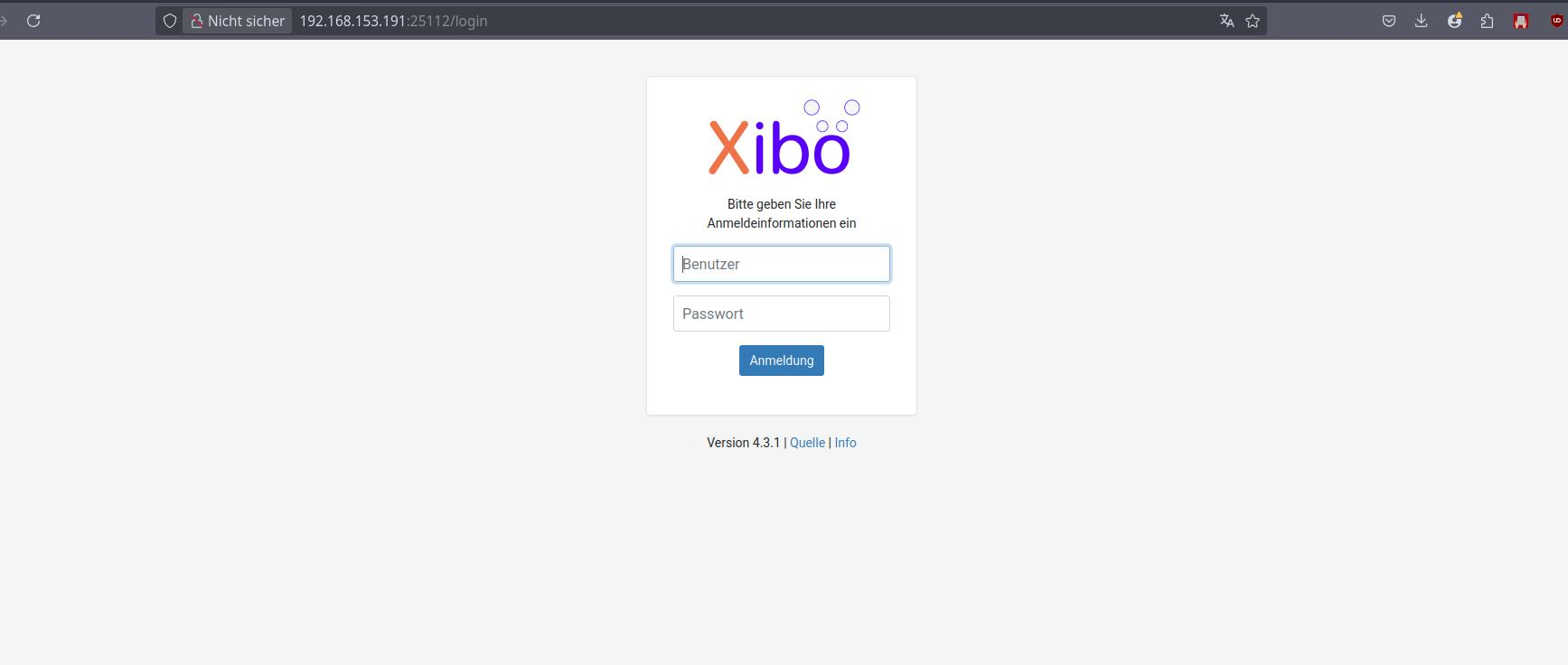
Halleluja
Es hat geklappt , Anleitung noch mal unter die Lupe genommen ,Fehler korrigiert.
Portumleitung angepasst

docker-compose.yml
ports:
            - "25112:80"

herzlichen Glückwunsch :grinning:

1 „Gefällt mir“