Hallo, ich habe mehrmals versucht bei Hetzner eine öffentliche Instanz zu installieren. Der Prozess läuft ohne ersichtliche Fehler durch. Nach der Installtion scheitere ich immer beim Login. Der Forum Beitrag vom Juli 2024 zum Thema LDAP nicht erreichbar, konnte mir leider nicht weiterhelfen.
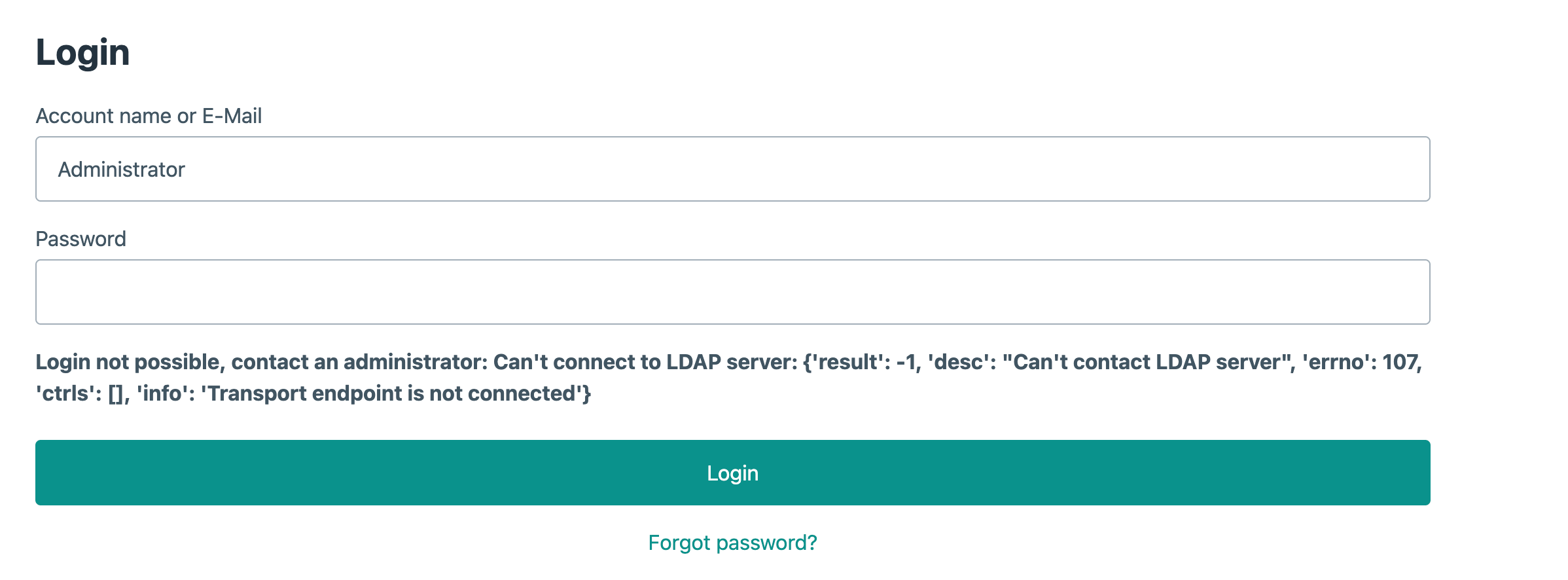
Hatte ich auch mal, da waren Sonderzeichen im Passwort welche nicht verwendet werden sollten.
Als Sonderzeichen im Passwort wurde lediglich das Pluszeichen benutzt. Das war bei vorherigen Instanzen auch kein Problem.
Gerne mal per SSH verbinden und mit jounalctl -u samba-ad-dc.service nachsehen, ob er uns eine Fehlermeldung gibt.
Was für Werte hast Du denn bei der Installation verwendet?
Hallo,
root@la:~# jounalctl -u samba-ad-dc.service
-bash: jounalctl: command not found
root@la:~#
Ich habe den Libre Workspace Copy & Paste auf einen auf einem frischen Debian 13 mit diesen Befehlen installiert:
Setup Repository
sudo apt install -y debian-keyring debian-archive-keyring apt-transport-https curl
curl -1sLf ‘https://repo.libre-workspace.org/gpg.key’ | sudo gpg --dearmor -o /usr/share/keyrings/libre-workspace-archive-keyring.gpg
echo “deb [arch=amd64 signed-by=/usr/share/keyrings/libre-workspace-archive-keyring.gpg] https://repo.libre-workspace.org stable main” | sudo tee /etc/apt/sources.list.d/libre-workspace-stable.list > /dev/null
sudo apt update
Install Libre Workspace Portal
sudo apt install libre-workspace-portal
This message can be ignored:
N: Download is performed unsandboxed as root as file ‘/root/libre-workspace-portal.deb’ couldn’t be accessed by user ‘_apt’. - pkgAcquire::Run (13: Permission denied)
If you don’t run the graphical welcome assistant:
sudo systemctl enable libre-workspace-service --now
Sorry, hatte einen Tippfehler:
journalctl -u samba-ad-dc.service
Dann danach einmal die Ende-Taste drücken 
Hallo,
habe ich gemacht, bekomme trotzdem keine Ausgabe. Das Problem scheint mit Debian 13 und Samba zusammen zu hängen.
Was kommt denn für eine Ausgabe?
Ansonsten mal mit sudo versuchen.
Ich habe die Instanz gelöscht und neu aufgesetzt, auf einen V Server bei Hetzner mit Debian 13 Trixie.
Danach bin ich der bin der Anleitung gefolgt
sudo apt install -y debian-keyring debian-archive-keyring apt-transport-https curl
curl -1sLf ‘https://repo.libre-workspace.org/gpg.key’ | sudo gpg --dearmor -o /usr/share/keyrings/libre-workspace-archive-keyring.gpg
echo “deb [arch=amd64 signed-by=/usr/share/keyrings/libre-workspace-archive-keyring.gpg] https://repo.libre-workspace.org stable main” | sudo tee /etc/apt/sources.list.d/libre-workspace-stable.list > /dev/null
sudo apt updatesudo apt install libre-workspace-portal
Ich konnte das Passwort setzen, die Domaine und die Module auswählen. Ich habe die Default Werte übernommen. Danach läuft die Installation durch.
Ich komme jetzt gar mehr bis zum Login. Sondern immer nur die Meldung, dass die Seite nicht erreichbar ist.
Die Nextcloud ist erreichbar und läuft. Das Portal und die anderen sind nicht erreichbar.
Wenn ich per ssh den Befehl sudo journalctl -u samba-ad-dc.service eingebe kommt
– No entries –
der Befehl sudo ufw status gibt folgendes aus:
Status: active
To Action From
80/tcp ALLOW Anywhere
443 ALLOW Anywhere
22/tcp ALLOW Anywhere
636 ALLOW Anywhere
88 ALLOW Anywhere
464 ALLOW Anywhere
139 ALLOW Anywhere
445 ALLOW Anywhere
3389 ALLOW 192.168.0.0/16
3389 ALLOW 172.16.0.0/12
10000/udp ALLOW Anywhere
80/tcp (v6) ALLOW Anywhere (v6)
443 (v6) ALLOW Anywhere (v6)
22/tcp (v6) ALLOW Anywhere (v6)
636 (v6) ALLOW Anywhere (v6)
88 (v6) ALLOW Anywhere (v6)
464 (v6) ALLOW Anywhere (v6)
139 (v6) ALLOW Anywhere (v6)
445 (v6) ALLOW Anywhere (v6)
10000/udp (v6) ALLOW Anywhere (v6)
Sieht dann so aus als ob Samba-AD-DC bei Dir nicht existiert/nicht eingerichtet wurde.
Was sagt denn
sudo journalctl -u libre-workspace-portal
Was für eine Domain hast Du genau eingetragen?
Evtl. hast Du auch ein Sonderzeichen im Passwort, was nicht okay ist, aber da sollten wir eigentlich mittlerweile alles “böse” verboten haben.
Als Domain ist andibandi.org eingetragen. Das Sonderzeichen im Passwort sind zwei hintereinander folgende Pluszeichen. cloud.andibandi.org ist erreichbar und ich kann mich dort anmelden.
root@la:~# sudo journalctl -u libre-workspace-portal
Oct 06 16:10:14 cloud systemd[1]: Started libre-workspace-portal.service - Libr>
Oct 06 16:10:14 cloud libre-workspace-portal[10346]: /
Oct 06 16:10:15 cloud libre-workspace-portal[10386]: Operations to perform:
Oct 06 16:10:15 cloud libre-workspace-portal[10386]: Apply all migrations: ad>
Oct 06 16:10:15 cloud libre-workspace-portal[10386]: Running migrations:
Oct 06 16:10:15 cloud libre-workspace-portal[10386]: No migrations to apply.
Oct 06 16:10:16 cloud libre-workspace-portal[10432]: 180 static files copied to>
Oct 06 16:10:17 cloud libre-workspace-portal[10439]: RSA key successfully creat>
Oct 06 16:10:18 cloud libre-workspace-portal[10451]: processing file django.po >
Oct 06 16:10:18 cloud libre-workspace-portal[10451]: processing file django.po >
Oct 06 16:10:18 cloud libre-workspace-portal[10346]: Setting number of workers >
Oct 06 16:10:18 cloud libre-workspace-portal[10459]: [2025-10-06 16:10:18 +0000>
Oct 06 16:10:18 cloud libre-workspace-portal[10459]: [2025-10-06 16:10:18 +0000>
Oct 06 16:10:18 cloud libre-workspace-portal[10459]: [2025-10-06 16:10:18 +0000>
Oct 06 16:10:18 cloud libre-workspace-portal[10460]: [2025-10-06 16:10:18 +0000>
Oct 06 16:11:58 cloud libre-workspace-portal[10481]: Starting installation…
Oct 06 16:11:58 cloud libre-workspace-portal[10481]: Doing installations basics>
Oct 06 16:11:58 cloud libre-workspace-portal[10483]: WARNING: apt does not have>
Oct 06 16:11:58 cloud libre-workspace-portal[10483]: Hit:1 http://mirror.hetzne>
Oct 06 16:11:58 cloud libre-workspace-portal[10483]: Hit:2 http://deb.debian.or>
Oct 06 16:11:58 cloud libre-workspace-portal[10483]: Hit:3 http://deb.debian.or>
Oct 06 16:11:58 cloud libre-workspace-portal[10483]: Hit:4 http://deb.debian.or>
Oct 06 16:11:58 cloud libre-workspace-portal[10483]: Hit:5 http://mirror.hetzne>
Dann kommen weit über 1000 Zeilen, hier die Zeilen wo es ein Fail gab.
la systemctl[18056]: Failed to disable unit: Unit systemd-resol
Oct 06 16:13:15 la systemctl[19680]: Failed to enable unit: Unit samba-ad-dc.se
Oct 06 16:13:18 la systemctl[20778]: Failed to restart samba-ad-dc.service: Uni>
Oct 06 16:13:20 la systemctl[20947]: Failed to enable unit: Unit samba-ad-dc.se>
Oct 06 16:13:20 la systemctl[20948]: Failed to restart samba-ad-dc.service: Uni>
Die Fehlermeldung ist auf der rechten Seite.
Bitte nochmal wiederholen und mit der Pfeiltaste nach rechts scrollen.
la systemctl[18056]: Failed to disable unit: Unit systemd-resolved.service does not exist
la systemctl[19680]: Failed to enable unit: Unit samba-ad-dc.service does not exist
a systemctl[19686]: Failed to start samba-ad-dc.service: Unit samba-ad-dc.service not found.
a systemctl[20778]: Failed to restart samba-ad-dc.service: Unit samba-ad-dc.service not found.
la systemctl[20947]: Failed to enable unit: Unit samba-ad-dc.service does not exist
la systemctl[20948]: Failed to restart samba-ad-dc.service: Unit samba-ad-dc.service not found.